These are synthetic practice files created by BLZN Works. The screenshots show actual operator runs of the browser demos: SUG 1.0.0, IMG 1.0.0 and MFP 1.0.1. They are not customer results. Processing takes place in your browser; no store, accounting or Merchant Center connection is required.
SUPPLIER UPDATE GUARD · ABOUT 3 MINUTES
Review a supplier price change before a Shopify import
Fits: a store operator with a fresh, complete Shopify CSV export and supplier CSV containing the same exact, unique SKUs. This review updates existing-variant selling prices.
For a few direct edits, the bulk editor in your existing Shopify admin or a spreadsheet may already be enough. Choose the full edition when its ready-made review and export workflow fits your task; this example does not establish a time-saving advantage.
- Download the practice Shopify export and supplier CSV. In the free SUG demo, select them as the store and supplier files, then choose Confirm formats and parse.
- Map SKU to
supplier_item_code, value tonew_unit_costand notes tonotes. Choose Markup, USD and 40%. Choose Calculate price review. - Compare the proposed prices:
001-A = 14.00,001-B = 16.80andMUG-01 = 10.50.UNKNOWN-01has no store match. The two shirt price drops require individual approval. Nothing starts approved; approving only the mug changes the approved count from zero to one.
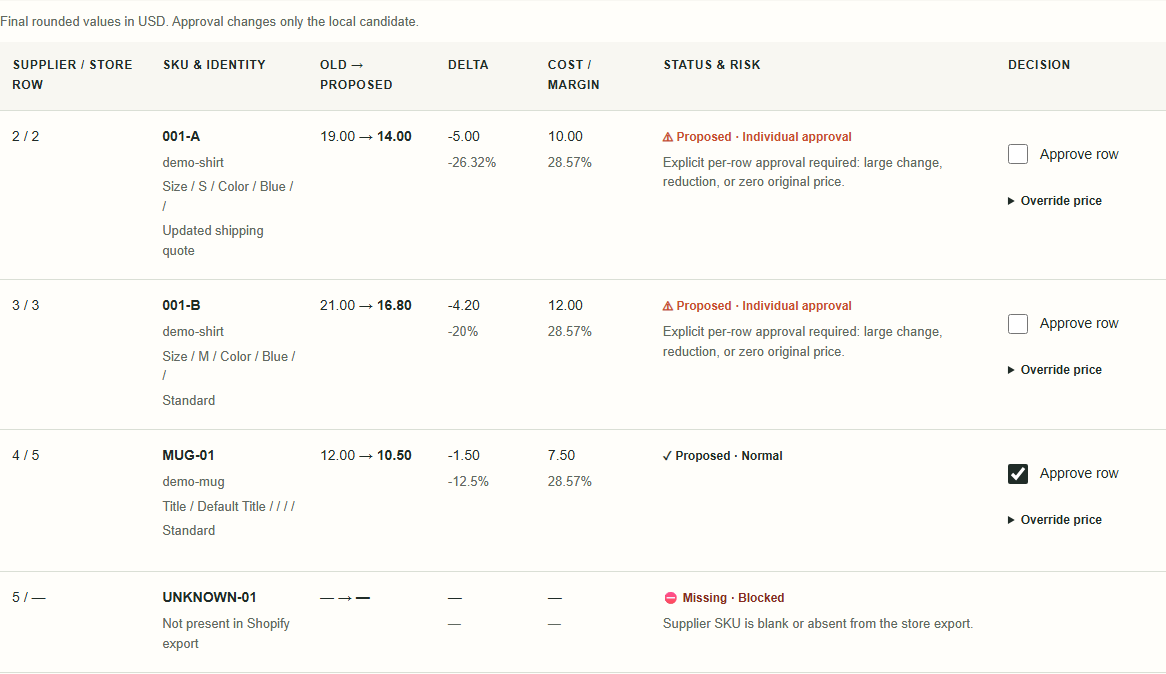
Before using your files: keep a fresh backup. The demo reviews the first 10 supplier rows and creates no download files. The full edition prepares reviewed files for your separate, manual import. No stock sync, new products, Cost per item writes, fuzzy matches, currency conversion or unit-priced products.
Detailed walkthrough and expected results · Formats, backup and import limits · Full edition: $19 USD once, plus applicable tax, for hosted 1.x access
INVOICE MATCH GUARD · ABOUT 3 MINUTES
Find five invoice exceptions before approval
Fits: a purchasing or accounts-payable operator with one purchase order and its corresponding supplier invoice as CSV or a supported single-sheet, values-only XLSX. Both need exact item IDs, quantities, unit prices and one currency.
If your spreadsheet already provides the checks and records you need, it may be enough. The full edition adds downloadable review reports for supported tables; include file-preparation work when deciding whether that workflow fits.
- Download the practice purchase order and practice supplier invoice. Open the free IMG demo and select the two files. The headers map automatically; inspect the mappings.
- Choose USD and Point decimal separator. Enter declared net totals 231.00 for the PO and 248.50 for the invoice. Acknowledge that the files contain net line amounts before tax, discounts and shipping, then choose Compare documents.
- Expect 5 item groups to review: BOLT-01 has a unit-price increase of 0.50; SEAL-02 has one extra unit and a supplied line total 1.00 above its calculation; FILTER-03 is missing; WASHER-05 is extra; DUP-04 is ambiguous because the PO repeats its ID.
The PO calculated net is 231.00. The invoice calculated net is 247.50, while its supplied and declared net totals are 248.50. Expect 1 document totals need review. A declared total that agrees with the supplied lines can still disagree with their arithmetic. Duplicate rows remain in source totals and are never paired automatically.
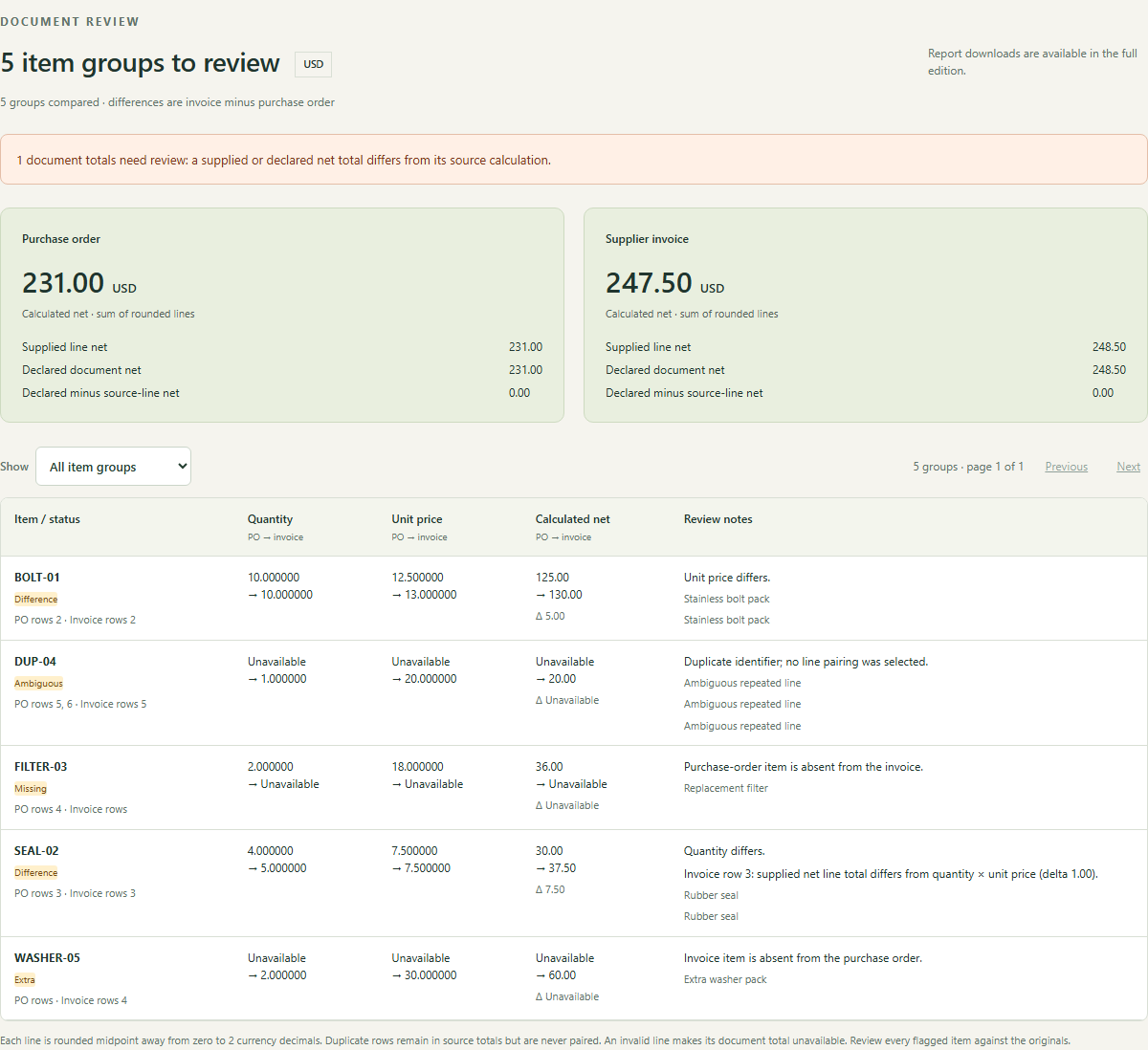
Before using your files: the demo accepts up to 20 rows per file and has no report exports. No PDF invoice intake, OCR, goods-receipt checks, tax or discount reconstruction, credit notes, currency conversion, accounting connection or payment approval. The full edition exports review reports; a PDF report is not PDF invoice parsing.
Supported formats, calculations and limits · Full edition: $29 USD once, plus applicable tax, for hosted 1.x access
MERCHANT FEED PREFLIGHT · ABOUT 3 MINUTES
Find three feed errors before upload
Fits: a feed operator or small agency preparing a flat UTF-8 CSV/TSV with English Google attribute names. The screenshot was captured with MFP 1.0.1 and the dated gmc-file-rules-2026-10-21 subset. The current 1.0.2 demo uses gmc-file-rules-2026-10-23; the same practice files were checked again and retain the three-error then zero-error result below.
Merchant Center already provides processing diagnostics, and free file checkers are available; they may cover your needs. Use this when a separate file review and reusable findings report fit your workflow.
Known limitation in version 1.0.1: otherwise valid GTINs containing ASCII spaces or hyphens could be incorrectly flagged. Version 1.0.2 corrects that formatting check while retaining invalid-checksum findings and the original input value. The tool still does not assess every title or policy rule.
- Download the feed before correction and corrected feed. Open the free MFP demo, choose Tab · TSV and select the first file.
- Choose target country US, destination Shopping ads, feed currency USD and fallback category General. Confirm the context and choose Review feed.
- Expect 3 errors in supported checks: a duplicate ID on source row 3, a malformed image URL on row 4 and
12.00 EURinconsistent with USD on row 4. Select the corrected file, acknowledge again and review: 0 errors in supported checks.
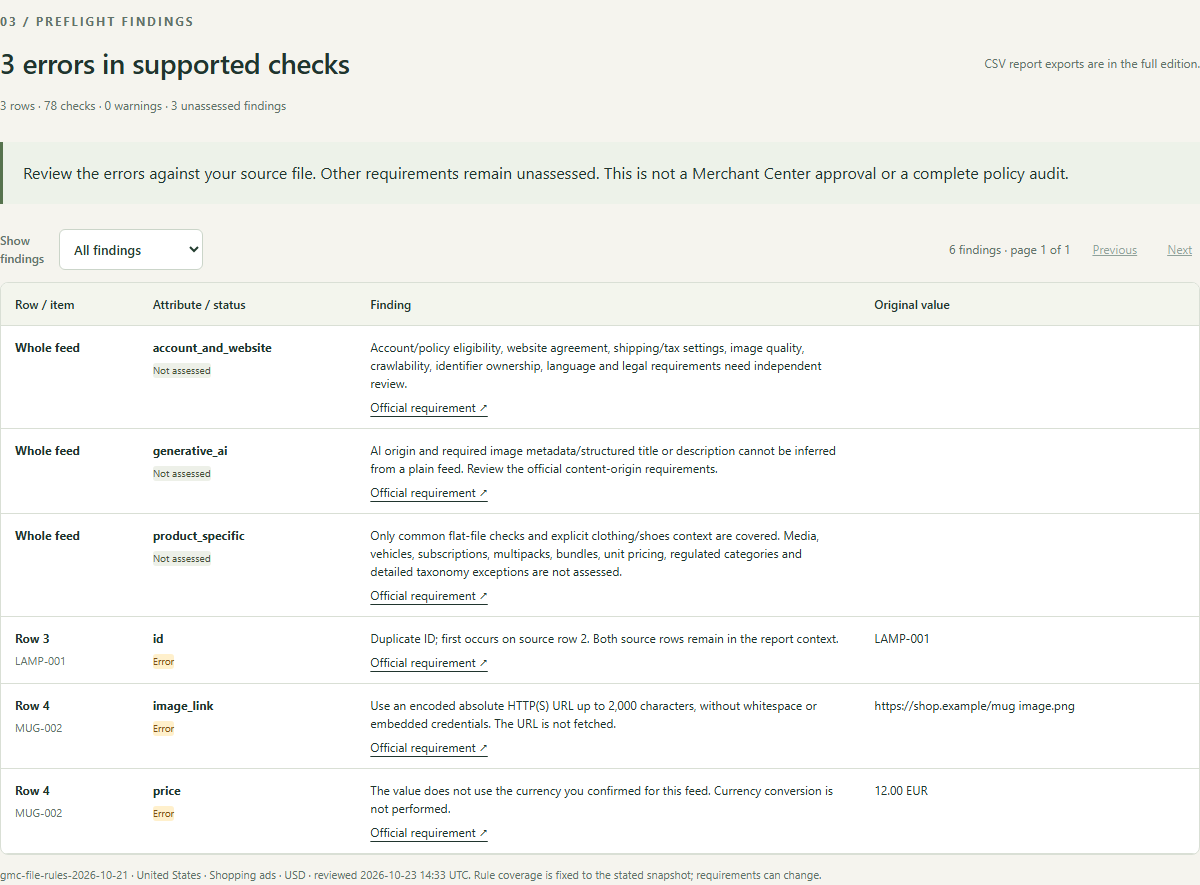
Zero file errors does not mean Google approval. Both files retain three Not assessed findings covering external checks, content origin and category coverage. The tool does not fetch URLs, inspect images or landing pages, verify ownership of identifiers, assess account or policy eligibility, resolve suspensions or sync a feed. The demo accepts up to 50 rows; the full edition exports the complete findings CSV.
Detailed walkthrough and expected rows · Rule coverage and unassessed areas · Full edition: $19 USD once, plus applicable tax, for hosted 1.x access
These examples and screenshots are released under CC0 1.0. Do not upload practice files to a live store, accounting system or Merchant Center. Compare all products or ask about a specific format; keep confidential document contents and credentials out of your message.